
 Master CAWEB
 Designing for Cognitive Load
The Invisible Force Behind User Experience and Digital Strategy
Introduction: When Thinking Becomes Friction
In digital environments, users rarely notice when an interface feels easy. However, they immediately perceive when something feels difficult, confusing, or mentally exhausting. This difficulty is often not visual but cognitive. Behind many usability problems lies an invisible factor: cognitive load.
Cognitive load refers to the mental effort required to process information, understand a system, and complete a task. In UX design, managing cognitive load is not merely about simplifying layouts or reducing text. It is about structuring information in a way that aligns with human cognitive capacities. Research institutions such as the Nielsen Norman Group have consistently demonstrated that interfaces demanding excessive mental effort lead to higher abandonment rates and lower satisfaction.
From a digital strategy perspective, cognitive load influences bounce rate, time on page, conversion rates, and even brand perception. It therefore occupies a central position at the intersection of UX design and digital marketing performance.
Understanding Cognitive Load in UX
The concept of cognitive load originates from educational psychology and distinguishes between intrinsic, extraneous, and germane load. Intrinsic load refers to the inherent complexity of a task. For example, completing an online tax declaration will naturally require concentration. Germane load describes the productive effort that contributes to understanding and learning. Extraneous load, however, is the unnecessary mental effort caused by poor design decisions.
In UX, the goal is not to eliminate complexity altogether. Instead, designers must reduce extraneous load so users can focus their cognitive resources on meaningful actions. When navigation is inconsistent, when multiple calls-to-action compete for attention, or when content
lacks hierarchy, users are forced to think about how to use the interface rather than completing their intended task. At that moment, friction replaces flow.
Information Architecture as Cognitive Infrastructure
Cognitive load is deeply connected to information architecture. Before visual design even begins, the structure of content determines how easily users can form mental models of a system. Tools and methodologies promoted by companies such as Slickplan emphasize that clarity at the structural level prevents confusion at the interaction level.
When categories are logically organized and labels correspond to user expectations, navigation becomes predictable. Predictability reduces uncertainty, and reduced uncertainty lowers cognitive strain. Users do not need to pause to interpret the interface; they move through it intuitively.

Visualization of a hierarchical structure
This structural clarity also has technical implications. A well-organized architecture improves crawlability and content discoverability, which indirectly supports search engine optimization. What benefits users often benefits search engines as well.
The SEO Dimension of Cognitive Load
Although cognitive load is primarily discussed in UX research, it has measurable consequences for SEO. Search engines such as Google increasingly evaluate behavioral signals, including dwell time, engagement metrics, and interaction depth. When users encounter cognitively demanding interfaces, they are more likely to abandon the page quickly.
High bounce rates are not always caused by irrelevant content. Sometimes they are caused by excessive mental effort required to interpret that content. If a user must decipher complex layouts, scan dense paragraphs without visual breaks, or navigate ambiguous menus, the likelihood of early exit increases significantly.
Digital marketing platforms such Semrush as highlight that visibility alone does not guarantee performance. Traffic acquisition must be complemented by user experience optimization. In this sense, cognitive efficiency becomes a competitive advantage. Attracting users through SEO is only the first step; retaining them requires cognitive clarity.
Visual Hierarchy and Attention Management
Visual hierarchy functions as a cognitive guide. Through the deliberate use of typography, spacing, contrast, and structural headings, designers can direct attention without overwhelming the user. Short paragraphs, consistent patterns, and clearly distinguished sections reduce the need for conscious interpretation.
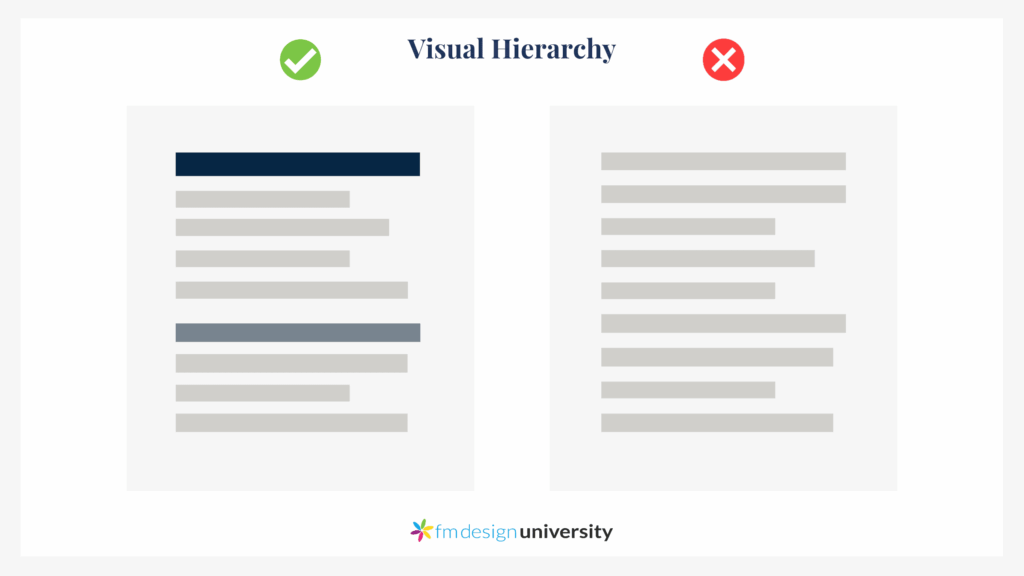
Good vs bad visual hierarchy
Users rarely read content word by word. Instead, they scan and evaluate relevance within seconds. An interface that aligns with scanning behavior lowers mental effort and supports faster decision-making. In this context, whitespace is not empty space; it is cognitive breathing room. By organizing information into digestible segments, designers allow users to process complexity progressively rather than all at once.
Cognitive Overload in the Age of AI
As digital ecosystems integrate artificial intelligence, dashboards and personalized interfaces risk becoming increasingly dense. While personalization aims to reduce cognitive effort by tailoring content, it can paradoxically increase complexity if it lacks transparency and structure.
Interfaces that constantly adapt, reorder content, or generate multiple recommendations may create a sense of instability. Users must repeatedly rebuild their mental model of the system. This ongoing adaptation demands cognitive resources and may generate discomfort rather than efficiency.
Future-oriented UX design must therefore balance automation with stability. The most effective AI-driven systems will be those that reduce visible complexity while maintaining user control and clarity. Intelligence should simplify tasks, not multiply decisions.
Cognitive Diversity and Inclusive Design
Cognitive load does not affect all users equally. Individuals navigating in a second language, people experiencing stress, or neurodivergent users may experience higher mental strain in digital environments. Designing with reduced cognitive load in mind therefore enhances
accessibility and inclusion.
Clear language, predictable navigation, and progressive disclosure benefit a broad spectrum of users. What appears as a minor design adjustment may significantly improve usability for individuals with cognitive differences. In this sense, managing cognitive load is both a usability strategy and an ethical commitment. Reducing mental effort does not oversimplify content; it democratizes access.
Toward Cognitively Sustainable Design
In an increasingly saturated digital landscape, attention has become a scarce resource. Users navigate multiple interfaces daily, often under time pressure and cognitive fatigue. Designing for cognitive sustainability means respecting this limited capacity.
Cognitive load remains invisible, yet its impact is measurable through engagement, satisfaction, and conversion metrics. The most effective digital experiences are not necessarily the most innovative or visually striking. They are the ones that feel effortless. Design is not about removing intelligence from systems. It is about removing unnecessary thinking from users.
In 2026, reducing cognitive friction may be one of the most strategic decisions a UX designer can make.